

GENBILGENBIL
TR Contact us →
Solutions
AI Consultancy
Services
About Us Türkçe Contact us →
Dispatcher AIDispatcher AI
EMAIL INTAKE FOR DYNAMICS 365

AI reads.
Code checks and decides.

Dispatcher AI works through the customer emails in your Dynamics 365 dispatch queue the way your team does. It reads the email and its attachments, identifies the category, finds the customer and the contract, and opens the service case. When it doesn't have enough to go on, it hands the email back to your team with the reason.

Dynamics 365Runs on your serversMicrosoft Foundry models
1
model call
Each email is read in one pass, attachments included.
152
deterministic rules
139 matching rules and 13 checkpoints.
18
hand-back reasons
Every email it returns to your team says why.
0
CRM permissions
The model can't act in the CRM. Code writes the records.
WHAT IS DISPATCHER AI?

A teammate that reads every email and follows your rules.

Dispatcher AI is software that takes customer emails from your Dynamics 365 dispatch queue and does what a dispatcher does: it reads the email and its attachments, works out what the customer is asking for, finds the customer and the contract, and opens the right service case.

The AI part is limited to reading. Every decision is made by code, against rules your team can see and change, and every email ends in one of three ways: the case is opened, opened with a flag for review, or handed back to your team with the reason.

Works inYour Dynamics 365 dispatch queue, next to your dispatchers
ReadsEmail text and attachments: PDFs, scans, photos, Word and Excel files
Decides with152 deterministic rules: 13 checkpoints and a 139-rule matching matrix
Ends inAn open case, a flagged case, or a hand-back with the reason
Runs onYour own servers, with a model of your choice from Microsoft Foundry or any OpenAI-compatible endpoint
WHO IS IT BUILT FOR?

Teams whose inbox is a work queue.

If your customers send requests by email with forms and documents attached, and someone on your team reads, sorts and keys them into Dynamics 365 by hand, Dispatcher AI is built for that work.

WHERE IT RUNS TODAY

Pension and life insurers

Built first for pension and life operations on PensionSoft. Contribution changes, exits, transfers, payment method changes and letter requests arrive with signed request forms and ID documents, and every one has to land on the right contract.

Contribution changesExits and transfersPayment methodLetters
SAME PATTERN

Insurers and financial services

Policy, account and claim requests that come in by email with forms and identity documents, where every decision has to be traceable to a rule.

ANY DYNAMICS 365 TEAM

Service teams on Dynamics 365

A shared mailbox that feeds a Dynamics 365 queue, recurring request types, and categories you can describe in instructions. You switch on automation one category at a time.

Operations managers

Fewer emails to sort by hand, and a reason for every one that comes back.

Dispatch teams

Start from the AI's notes on the case instead of a blank screen.

CRM and IT teams

One connector to Dynamics 365, your servers, your choice of model.

Risk and compliance

Every decision is logged with the rule behind it; national IDs never reach the logs.

ONE EMAIL, END TO END

How one email is processed.

A representative example from a pension provider's service queue: about five seconds from the queue to an open case, with the AI reading and the code deciding.

Representative example · pension service queue
1Incoming email00.0 s
I'd like to raise my contribution
m.yilmaz@example.com

Hello, I'd like to raise the monthly contribution on my pension plan from 700 to 1,000 TRY. My signed request form and my ID are attached.

request-form.pdfid-card.jpg
2What the AI read03.3 s
CategoryContribution change0.94
National ID123••••••••att 2
NameMehmet Yılmazatt 2
New amount1,000 TRYbody
DocumentRequest form · signedatt 1
DocumentID cardatt 2
3What the code checked04.7 s
Category is in the catalogG1
Category is open to automationG2
Confidence above 0.80G11
Customer and contract matchedG5
Required data completeG8
Required documents completeG9
6 of 6 checks passed · T4, very high
4Case opened05.0 s
OPENEDContribution changeCAS-04812-P3K9T1
CustomerMehmet Yılmaz · contract matched
DocumentsRequest form, ID card, attached by type
WorkflowStarted · pension operations
Note6 checks passed, nothing to verify
DIVISION OF LABOR

AI does the reading. Code makes the call.

The model only reads the email and its attachments and pulls out the information needed. Searching the CRM, running the checks and saving the record are handled by Dispatcher AI's own code, so you can see which rule every decision rests on.

MODELReads and extracts

Reads the email text and every attachment in one call. Returns the likely categories with a confidence score, and each piece of information with its source. Its answer must fit a predefined JSON schema.

CODESearches, checks and saves

Looks up the customer and the contract in the CRM, runs the 13 checkpoints in order, decides with the 139-rule matching matrix and creates the record. The model can't call any tool.

One email, six steps
01

Takes it from the queue

Claims the email, so two people or two servers never work on the same one.

02

Prepares the attachments

Opens PDFs, scans, photos, Word and Excel files and tells their type from the content.

03

Reads it in one pass

Reads the text and every attachment together and sets signature and logo images aside.

04

Finds the customer

Searches by national ID, then contract or policy number, name, and sender address.

05

Runs the checks

Checks the confidence score, required data and documents, and any open request on the same subject.

06

Saves to the CRM

Opens the case, attaches documents by type and writes its findings into a note.

152

deterministic rules and checkpoints. Once the model has finished reading, only code makes the decision. The rules are laid out further down this page.

THREE OUTCOMES

Every email ends in one of three ways.

OPENS

If every check passes, it opens the case.

It attaches the documents by type and starts the workflow in the CRM.

FLAGS

If it isn't sure, it opens the case with a flag.

The case opens with a [VERIFY] note that tells your team what to check.

HANDS BACK

If it can't decide, it hands the email back.

It returns the email to the queue with the reason and writes what it read into a note, so your team doesn't start from scratch.

It handles the details of your operation

Several requests in one email

If one email asks for a contribution change and an address update, it opens two cases. If one gets stuck, the other still goes through.

The product line comes from the record

It doesn't guess whether a number belongs to a pension or a life product; it checks which product table holds it in the CRM.

No duplicate cases

If a case on the same subject is still open, it adds the email to that case, provided the sender is the customer, the payer or an authorized intermediary.

Customer not found: your call

The case can be opened under an unknown customer, held in the queue, or retried over a few days. You choose per category.

Sender verification

In sensitive categories, an email whose sender can't be verified isn't processed automatically.

Short outages don't stop the work

If the CRM or the model can't be reached, it retries three times, 15 minutes apart. When a business rule rejects a request, it doesn't retry.

THE RULES BEHIND THE DECISION

152 rules make the decision.

When the model has finished reading, the decision passes to code. Every request goes through 13 checkpoints, and a 139-rule matrix scores the match. The same findings always lead to the same decision, and each decision is logged with the code of the rule it rests on.

152139 matching rules
and 13 checkpoints
27signals that raise or lower the score
5confidence tiers (T0–T4)
3possible outcomes
17checks before a rules version is published
13 checkpoints, in the order they run
G4aResponse fits the schemaAI response unusable
G1Category is in the catalogCategory product line undefined
G2Category is open to automationOut of scope
G3A published instruction existsOut of scope
G11Confidence at least 0.80Confidence below threshold
G5Matrix allows the requestCustomer not found
G5bSender verifiedSender not verified
G7Contract number foundRequired field not extracted
G8Required data completeRequired field not extracted
G9cExcel list within sizeList too long
G9bAttachments are readableAttachment unreadable
G9Required documents completeRequired document missing
G12No open duplicate requestAdded to the open case
Right-hand label: the reason the email is handed back if the check fails.
The matching matrix
Matching matrixlive, version 4

Tier thresholds

T4Very high≥ 85
T3High≥ 60
T2Medium≥ 40
T1Low≥ 20
T0None< 20

Signal weights some of the 27 signals

National ID matches+55
Contract no. exact (holder)+45
Contract no. exact (payer)+35
Registered primary email+30
In the broker's portfolio+20
Full name exact+20
Date of birth matches+15
IBAN matches+10
Different name, third party−30
Email belongs to another customer−35
Channel outside the portfolio−35
Different name, plan holder−45
National ID doesn't match−55

Source priority

InformationFirst → then
National IDEmail body → attachment
Contract no.Email body → attachment
Policy no.Email body → attachment
Phone and emailEmail body → attachment
If the values differ, the value in the email text is used and a source-mismatch note is added to the case. If the national ID differs, the note says "National ID on the form is wrong".
How the score adds up
National ID matches+55Contract no. exact+45Full name exact+20
Total 120, capped at 100T4, very high
Registered primary email+30Full name exact+20Policy belongs to another customer−35
Total 15T0, no match

The tier alone doesn't set the outcome. Tier, category and contract status form a seven-part rule key, and the rule that fits the key best is applied.

ADMIN PANEL

You manage the rules, without writing code.

From an 18-screen panel you follow every step Dispatcher AI takes and change its rules. Instructions, 11 behavior settings and the matching matrix are kept with their version history. The Live Test screen shows the outcome without writing anything to the CRM.

Live flowlive
Contribution change
Done
Fund allocation change
Rules and matching
Life policy cancellation
AI is reading
Watch emails being processed in real time.The reading, search, check and save steps update second by second.
Handed back
Exit request
Required document missing
Reprocess
Address update
Confidence below threshold
Reprocess
Contract information
Customer not found
Reprocess
Up to 200 emailsReprocess in bulk
Reprocess what was handed back.One at a time or up to 200 emails at once, with an extra instruction if you like.
MUSE
What was the most common hand-back reason yesterday?
The most common was "Required document missing", mostly on exit requests. Shall we add the power of attorney to that category's document list?
New instruction versionApprove
Ask the panel.Muse works with your permissions and asks for your approval before it changes anything.
INSIDE THE ADMIN PANEL

See the admin panel up close.

Seven of the 18 screens. The data is anonymized for this page; the interface is the product as it ships.
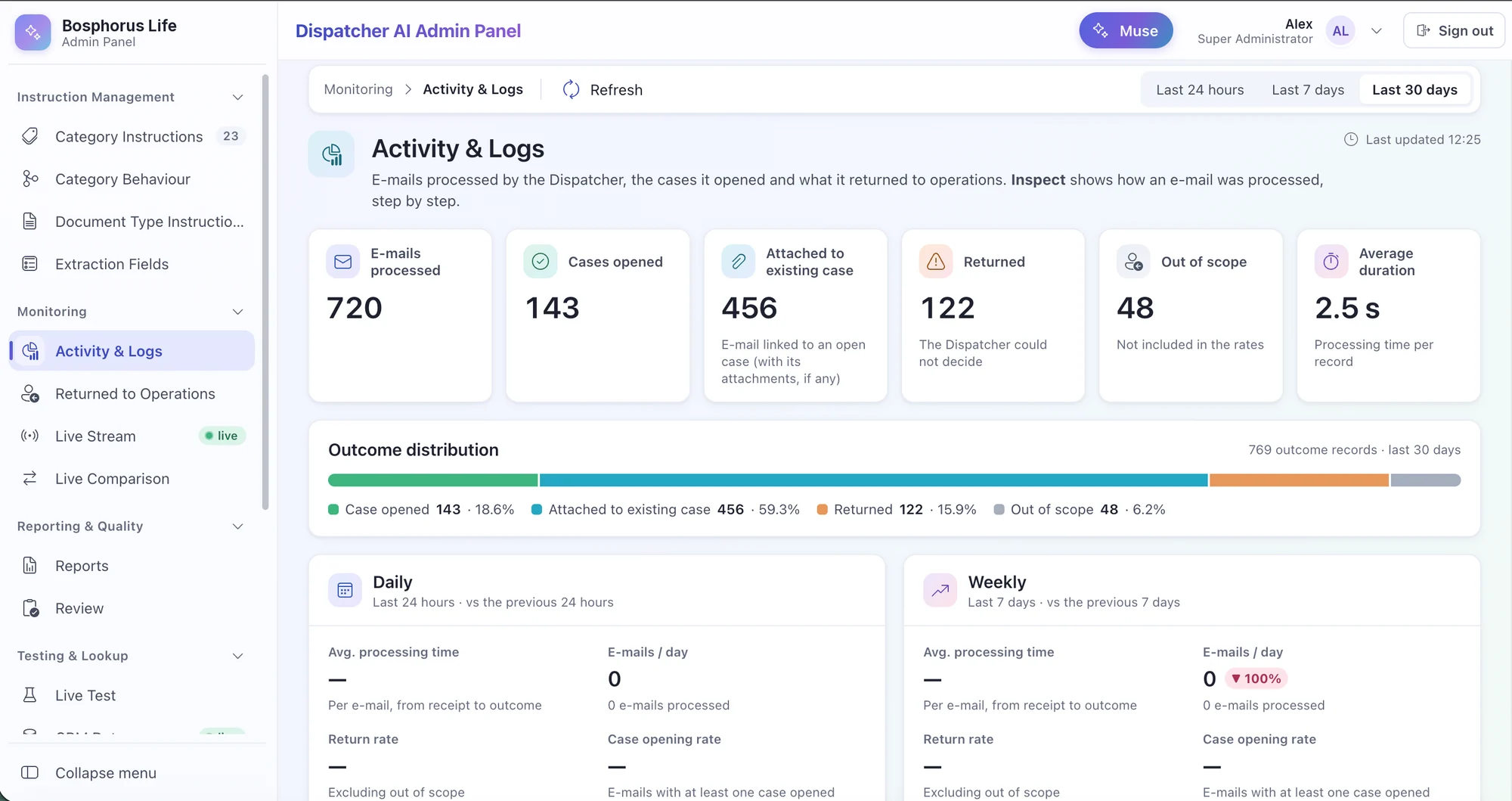
Dispatcher AI Admin Panel · Activity & LogsClick to enlarge
Activity & Logs

How every email ended: cases opened, attached to an open case, returned or out of scope, with daily and weekly comparisons.

Demo data · product interface

ARCHITECTURE

One more dispatcher joins your team.

The queue, the service cases and the BPM process stay as they are. Dispatcher AI works next to your dispatchers and takes work from the same queue, like any member of the team. Every component is installed on your own infrastructure.

One connection to the CRM

Only the connector API talks to Dynamics 365, and the business rules sit there too. If the CRM changes, only this layer changes.

The model is your choice

Dispatcher AI calls the model through one endpoint: a model in Microsoft Foundry, such as OpenAI's GPT or Anthropic's Claude, or any OpenAI-compatible endpoint. Switch it in the settings.

Work doesn't stop

Several servers are installed and one of them does the work at a time. If that server stops, a standby takes over.

PHASED ROLLOUT

Automation goes live one category at a time.

1

Compare

Dispatcher AI only reads the live queue and compares its decisions with your team's.

2

Choose categories

You switch on automation category by category. A category can't be switched on until its instruction is published.

3

Measure

5% of the cases opened automatically are reviewed against four criteria.

4

Expand

You change the threshold, the matrix and the rules from the panel, with no new release.

SECURITY AND DATA PROTECTION

Every step is on record.

FIRST STEP
Try it on your own emails first.
The first step is a comparison study: Dispatcher AI only reads your queue and puts its decisions next to your team's. Not a single record is written to the live CRM. The quote depends on your email volume, categories and hosting.
Plan a comparison study →
GET STARTED

Request a Dispatcher AI demo.

Tell us about your service queue and we'll reply within one business day.

SCHEDULE

Prefer to pick a time?

Soon you'll be able to book a 30-minute Dispatcher AI walkthrough directly in our calendar.

Online booking is coming soon Until then, the form is the fastest way to reach us.